 Blog RSS Feed
 Via E-mail
 Twitter
 Facebook
I believe most of Windows users ever face the annoying dialog box that suddenly pop – up on their screen just after Windows finish its startup process. Me too, got the same problem like below

Actually, this problem is caused by computer virus which infect your computer.
Operating System –-> Windows XP Service Pack 3

Actually, this problem is caused by computer virus which infect your computer.
Operating System –-> Windows XP Service Pack 3
- Update your antivirus program –-> run the full system scan on your computer –-> remove any virus detected by antivirus program.
- Press
to launch the Run dialog box like above --> typeregedit –-> click OK to launch the Registry Editor program like below.
- Based on the picture above, double click HKEY_LOCAL_MACHINE –->SOFTWARE –-> Microsoft –-> Windows NT -–> CurrentVersion –-> Winlogon
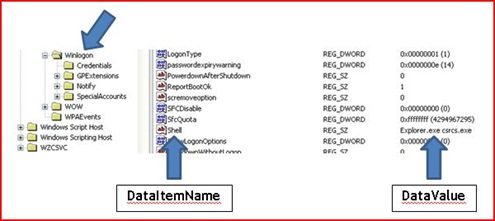
- Based on the above picture, find the DataValue named Explorer.exe csrcs.exe. After you found it, you will notice, the data represent theDataItemName named Shell.
- Now, right click on DataItemName named Shell –-> click Modify –-> the dialog box like below appears on your screen.
- Based on the picture above, remove the word csrcs.exe –-> leave the wordExplorer.exe intact –-> click OK
- Double click HKEY_LOCAL_MACHINE –-> SOFTWARE –-> Microsoft –-> Windows–-> CurrentVersion –-> policies –-> Explorer –-> Run
- Right click DataItemName named csrcs which has a data valueC:\Windows\System32\csrcs.exe –-> click Delete –-> click Yes –-> closeRegistry Editor program interface
- Restart the computer to see the result.


1 comments:
Thanx Zainal I hope You Are Great Person.
Post a Comment